
Board Minutes Template
Good board minutes are an accurate, concise record of decisions — not a transcript. Enter the organisation, meeting details, directors present and absent, the agenda items discussed, each motion with its mover, seconder and vote count, and the action items, and the generator checks quorum and produces formatted minutes ready for the secretary to review, circulate and have approved at the next meeting.
- Free to use
- No sign-up
- Runs in your browser
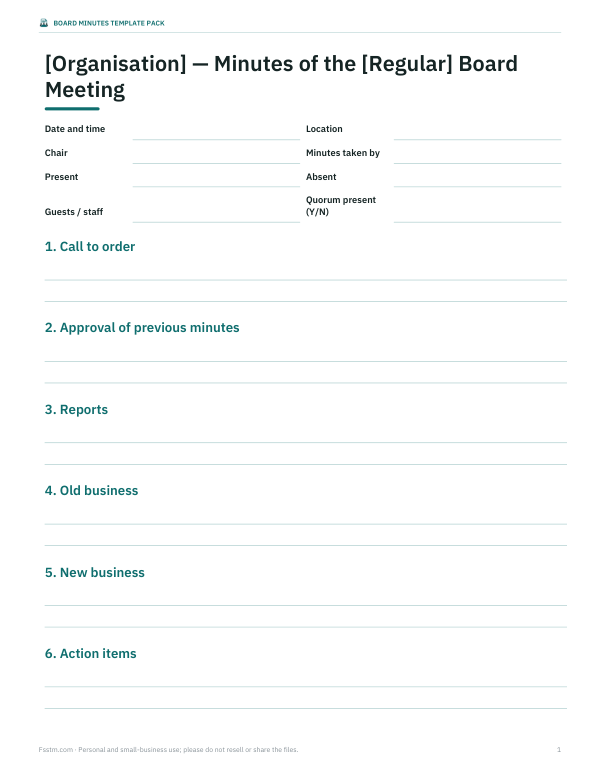
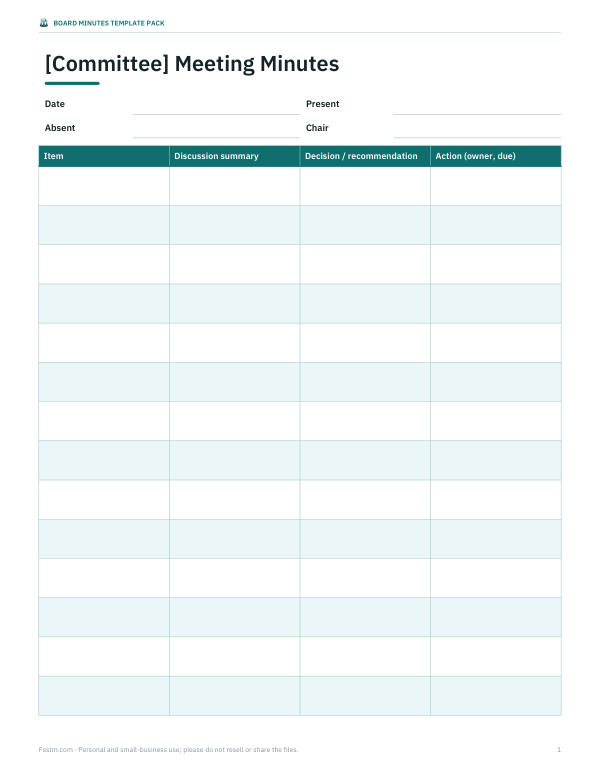
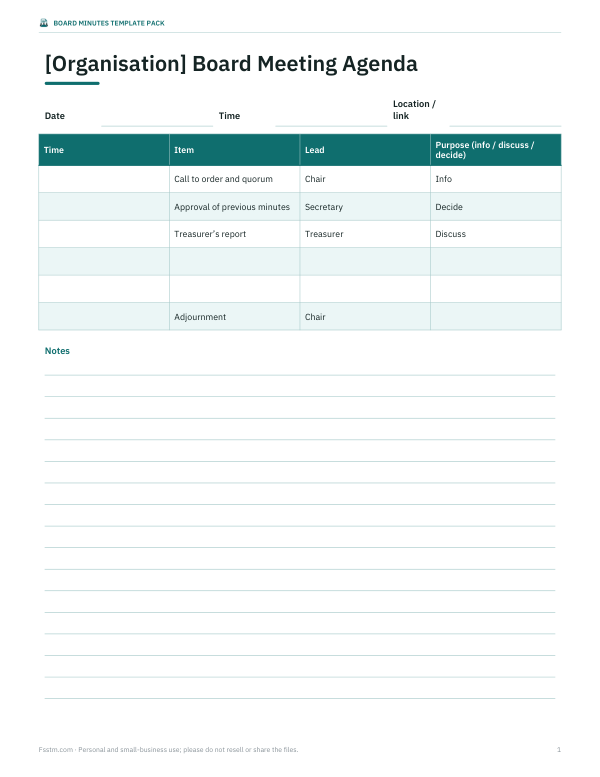
Board minutes generator
Board Minutes Template Pack
Editable Word templates for board, committee and annual meeting minutes, a board agenda template, an Excel motion and resolution log, an action item tracker and a minute-taker’s checklist.
- Board minutes (DOCX/PDF)
- Committee minutes (DOCX/PDF)
- Agenda (DOCX/PDF)
- Motion log (XLSX)
- Action tracker (XLSX)
- Minute-taker checklist (PDF, DOCX)
Formats: DOCX, PDF, XLSX. Instant download after payment (link valid 72 hours, up to 5 downloads). AI-assisted: the templates were drafted with AI help and reviewed and laid out before publishing.
$5.00 USD, one-time 6 files · about $0.83 each
- Instant download
- 7-day refund
- Secure checkout by Stripe
7-day money-back guarantee. Full refund within 7 days of purchase, even after you download.
Free sample: Action Item Tracker (PDF, 48 KB)
Full refund within 7 days — see the refund policy and license.
Free printables
Single sheets you can print right now, no sign-up. The full pack adds every sheet in one download plus the editable files.
 Printable Motion Log Template
 Board Action Item Tracker
 Printable Minute-Taker Checklist
What board minutes must record
| Section | What to include |
|---|---|
| Heading | Organisation name, type of meeting, date, time and place |
| Attendance | Directors present and absent, guests and staff, who chaired and who took minutes |
| Quorum | That a quorum was present (and when members arrived or left if it affects quorum) |
| Approval of minutes | Approval or correction of the previous minutes |
| Reports | Reports received, briefly summarised |
| Motions | Exact wording, mover, seconder (if your rules require one) and the result, with vote counts if required |
| Conflicts of interest | Any declared conflicts and whether the member left the room or abstained |
| Action items | Who will do what, by when |
| Adjournment | Time the meeting ended and next meeting date |
What to leave out
- Word-for-word transcripts of discussion.
- Personal opinions or characterisations (“heated debate”, “excellent idea”).
- Side conversations.
- Details from closed or confidential sessions — record them separately according to your organisation’s rules.
- Legal advice discussed in confidence, unless your counsel advises otherwise.
Minutes are a legal record of what the board decided. Courts, auditors, regulators and future boards may rely on them, so accuracy and neutrality matter more than detail.
Recording motions correctly
Write the motion exactly as it was voted on: “To approve up to $2,100 for shed repair from the maintenance fund.” Record who moved it and, if your rules require, who seconded. Then record the outcome — carried or failed — and the vote count, or at least whether it was unanimous. If a director asks for their vote or dissent to be recorded, include it by name. Amendments should show the amended wording that was finally voted on.
Quorum
A quorum is the minimum number of directors who must be present for the board to make valid decisions. Many bylaws set it at a majority of the board, but some use a fixed number or a fraction. The generator checks attendance against the rule you choose. If quorum is lost during a meeting (for example when a director leaves), the minutes should note the time, and the board generally cannot vote on further items until quorum returns.
From draft to approved minutes
- Take notes during the meeting using the agenda as the structure.
- Write up the draft minutes within a few days while memory is fresh.
- Ask the chair to review the draft for accuracy.
- Circulate the draft to directors with the next meeting’s papers, marked “draft”.
- Approve (with corrections if needed) at the next meeting by motion.
- Have the secretary sign and date the approved version and file it with the organisation’s records.
Worked example
The default example records a community garden association’s regular meeting: five of seven directors present, so a majority quorum of four is met. Three motions are recorded — approving the previous minutes, accepting the treasurer’s report, and approving up to $2,100 for a shed repair (4 for, 0 against, 1 abstaining) — all carried. A discussion item on a winter volunteer day records that no decision was made. Two action items with owners and due dates follow, and the meeting adjourns at 8:05 pm.
Minutes for special situations
| Situation | How to record it |
|---|---|
| Conflict of interest | Name the director, the nature of the conflict and whether they left the room or abstained |
| Closed / executive session | Record that the board went into closed session and any decision announced; keep confidential notes separately |
| Decisions by email or written consent | File the signed consent with the minutes and note it at the next meeting |
| Late arrival / early departure | Record the time, especially if quorum is affected |
Tips for minute-takers
- Prepare a template from the agenda before the meeting.
- Confirm the exact wording of each motion with the chair before the vote.
- Note arrival and departure times of directors if quorum is tight.
- Record action items as they are agreed, with an owner and date.
- Keep your own opinions out of the record.
- Store approved minutes securely and keep them for as long as your records policy or local law requires.
Formats
The generator produces formatted minutes you can print or download as an HTML file that opens directly in Microsoft Word or Google Docs for final editing. The paid pack adds Word templates for board, committee and annual meetings, an agenda template, a motion log and an action tracker.
Disclaimer and privacy
This tool helps format minutes; it is not legal advice. Follow your organisation’s bylaws and applicable law, and consult counsel for legal questions. Everything is processed in your browser — names and decisions are not uploaded or stored.
Frequently asked questions
What should board minutes include?
Date, attendance, quorum, approval of previous minutes, reports, motions with results, action items and adjournment.
Should minutes record who said what?
Generally no — record decisions and brief summaries, not verbatim discussion.
How soon should minutes be written?
Ideally within a few days, then circulated as a draft.
Who approves board minutes?
The board, usually at its next meeting, by motion.
What is a quorum?
The minimum number of directors required for valid decisions, set by the bylaws.
Do minutes need to record every vote?
Record the result of every motion; many boards also record vote counts or names of dissenters.
Is my data stored?
No, everything happens in your browser.